


Apple Watch Parts & Diagram
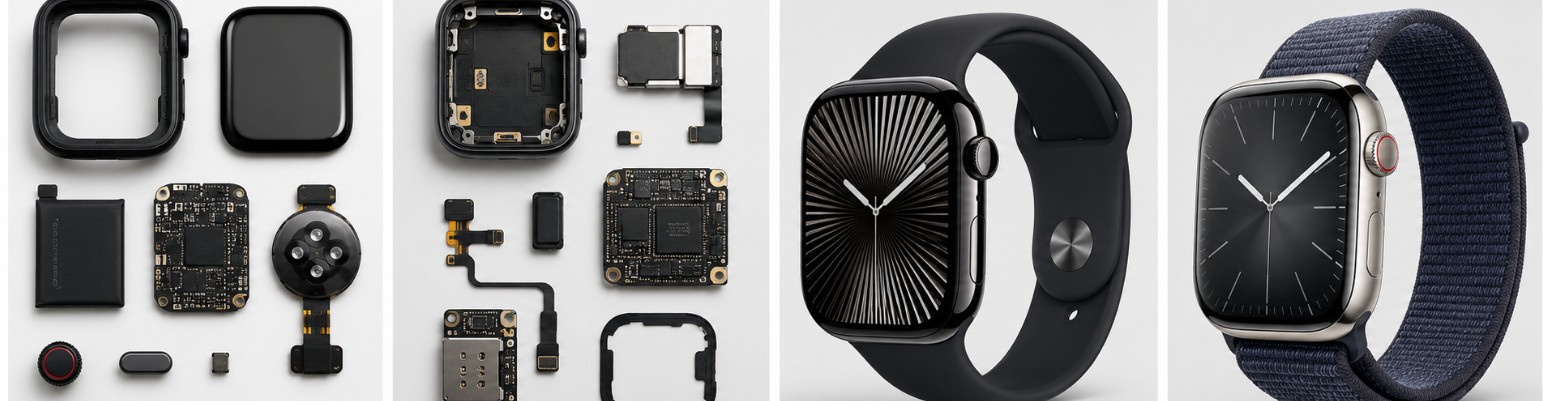
Apple Watch parts can be surprisingly model-specific, especially when you get into displays, batteries, sensors, Digital Crown assemblies, and internal flex cables. This guide breaks down common Apple Watch replacement parts, typical prices, useful parts diagrams, and repair manuals so you can better understand what is inside your watch before buying parts or attempting a repair.
What are you looking for?
- Buy Apple Watch Parts Online
- Parts for Apple Watch Price List
- Apple Watch Parts Diagram
- FAQ Apple Watch Parts/Diagram
Buy Apple Watch Parts Online
The Apple watch parts listed below are subject to availability and may not fit every Apple model or reference number. Before purchasing replacement parts, carefully review the product description, dimensions, compatibility details, seller ratings, and return policy to make sure the part is suitable for your specific Apple watch.
Apple Watch parts are especially tricky because compatibility can change not only between generations but also between case sizes within the same generation. A screen for a 42mm Apple Watch Series 10, for example, is not automatically interchangeable with a 46mm Series 10 screen. The same issue applies to batteries, flex cables, sensor assemblies, housings, speakers, and other internal components.
Before ordering anything, identify the exact Apple Watch series, case size, GPS or GPS + Cellular configuration, and preferably the model number printed on or associated with the watch. Apple has produced numerous versions ranging from the original Apple Watch and early Series models through Apple Watch SE, the regular Series lineup, and Apple Watch Ultra models.
Some of the easiest components to find online are replacement displays and batteries. You can browse Apple Watch replacement screens or compare Apple Watch replacement batteries, but double-check the supported model and case size before ordering.
For repairs that require opening the watch, you may also need replacement display adhesive. Apple Watch displays are sealed to the case, and the original adhesive generally should not be reused after opening the watch. You can find Apple Watch screen adhesive kits for many Series and SE models.
| Apple Parts Name | Buy/Search Apple Parts |
|---|---|
| Battery | amazon / ebay |
| Bezel | amazon / ebay |
| Books/Calendars | amazon / ebay |
| Box | amazon / ebay |
| Bracelet/Strap | amazon / ebay |
| Buckle | amazon / ebay |
| Case | amazon / ebay |
| Cleaning Supplies | amazon / ebay |
| Crown/Pusher | amazon / ebay |
| Dial | amazon / ebay |
| Glass/Crystal | amazon / ebay |
| Hands | amazon / ebay |
| Links/Spring Bars | amazon / ebay |
| Complete Movement | amazon / ebay |
Keep in mind that many Apple Watch internal parts sold through general marketplaces are aftermarket, refurbished, reclaimed from donor watches, or otherwise not sold as new genuine Apple components. Ask the seller about the source and condition of expensive components such as OLED screens, rear sensor assemblies, Digital Crown assemblies, and logic boards.
Opening an Apple Watch is also considerably more delicate than changing a watch band. The OLED display, thin flex cables, lithium-ion battery, sensors, and adhesive seal can easily be damaged. If you plan on performing the repair yourself, a set of Apple Watch repair tools including thin opening tools, tweezers, suction tools, and precision screwdrivers can make the job easier.
Parts for Apple Watch Price List
Below are the estimated prices for some of the most common Apple watch parts and replacement components. Actual prices may vary depending on the specific model, reference number, part condition, authenticity, availability, seller, and market demand. This list is not comprehensive and should be used only as a general pricing guide before purchasing Apple replacement parts.
- Apple Watch OLED Display and Touch Screen Assembly: Complete replacement displays for compatible Series, SE, or Ultra watches generally cost approximately $50 – $250.
- Apple Watch Replacement Battery: Model-specific lithium-ion replacement batteries commonly sell for around $15 – $60 depending on generation and supplier.
- Apple Watch Digital Crown Assembly: Replacement Digital Crown mechanisms or attached flex assemblies for compatible models typically cost approximately $15 – $70.
- Apple Watch Side Button Flex Cable: Model-specific replacement flex assemblies for the side button commonly cost approximately $10 – $40.
- Apple Watch Rear Sensor and Back Crystal Assembly: Replacement rear housings incorporating compatible sensor components may range from approximately $30 – $150.
- Apple Watch Taptic Engine: Replacement haptic feedback modules removed from compatible watches or sold refurbished generally cost approximately $15 – $60.
- Apple Watch Speaker Assembly: Internal speaker modules for selected Apple Watch generations typically sell for approximately $10 – $50.
- Apple Watch Force Touch Sensor Gasket: Force Touch sensor gaskets used on certain older Apple Watch generations generally cost approximately $5 – $25.
- Apple Watch Housing and Case Assembly: Replacement housings from compatible donor watches can range from approximately $30 – $150 depending on material and model.
- Apple Watch Logic Board / System Board: Used or donor internal boards are highly model-specific and may cost approximately $50 – $250 or more.
Replacement screen assemblies tend to be among the most expensive individual Apple Watch parts because the front assembly combines the display and touch interface. Prices vary considerably between older Series models and newer generations. Before purchasing, search specifically for your generation and size rather than simply searching for an “Apple Watch screen.”
Battery prices are generally much lower, but battery compatibility is equally important. A battery intended for one Series or case size should not be assumed to fit another. You can compare Apple Watch battery replacement kits that bundle the battery with adhesive and basic opening tools.
Another inexpensive but important item is the adhesive seal surrounding the display. Once an Apple Watch has been opened, replacing the adhesive is normally part of reassembly. Search for Apple Watch display replacement adhesive made specifically for your watch generation and case dimensions.

Hapysen Band Connector for Apple Watch Band Adapter Replacement Attachment
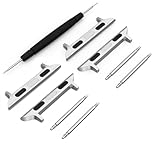
2 PACK Apple Watch Band Connector Spring Bar Apple Watch Strap Connector Stainless Steel Replaceable Metal Connection Adapter with Replacement Tool, Metal Connectors for Apple Watch Band(38mm/40mm/41mm+20mm Spring Bar, Silver*2)
Apple Watch Parts Diagram & Manuals
Apple does not provide conventional exploded-parts diagrams for every Apple Watch generation in the same way that you might find in a traditional mechanical watch service manual. However, Apple publishes detailed model illustrations and user documentation showing important external components such as the Digital Crown, side button, Action button, microphones, speakers, band-release buttons, and sensor areas.
For internal components and repair-oriented exploded views, third-party repair references such as iFixit can be useful. Always make sure the guide corresponds to your exact Apple Watch generation and case size because internal layouts and repair procedures vary considerably.
- Official Apple Watch Models and Component Diagrams: Apple illustrations identify Digital Crowns, buttons, microphones, speakers, rear sensors, band releases, and other model-specific components.
- Official Apple Watch User Guide: Apple’s comprehensive online manual covers hardware controls, charging, bands, watchOS features, troubleshooting, setup, and everyday operation.
- Apple Watch Series 10 Manuals and Downloads: Official Apple documentation page containing Series 10 information, technical documentation, and links to the Apple Watch User Guide.
- Apple Watch Ultra Manuals and Downloads: Official Apple resource providing Apple Watch Ultra documentation, technical information, and links to relevant user manuals.
- Apple Watch Series 10 Repair Guides and Parts: Third-party repair resource covering Series 10 battery, screen, internal access, tools, components, and step-by-step disassembly procedures.
The official Apple Watch model illustrations are particularly useful if you are simply trying to figure out what a visible part does. Depending on the model, Apple identifies components such as the Digital Crown, side button, microphone, speaker vents, optical heart sensors, electrical heart sensors, band-release buttons, and the Action button found on Apple Watch Ultra models.
For an internal repair, however, you need a guide for the exact generation. The internal construction of an Apple Watch Series 4, Series 7, Series 10, SE, or Ultra can be very different. Even two case sizes from the same generation can use different batteries and display assemblies.
Before disassembly, it is also worth taking photos of each stage. Apple Watch screws, brackets, connectors, and flex cables are extremely small, and having your own reference photos can make reassembly much easier.
FAQ Apple Watch Parts/Diagram
Can you buy replacement parts for an Apple Watch?
Yes. Replacement Apple Watch screens, batteries, adhesives, speakers, Taptic Engines, housings, flex cables, buttons, and other components can be found online. Availability depends heavily on the Apple Watch generation and size, and many internal components are aftermarket, refurbished, or recovered from donor watches rather than new genuine Apple parts.
How do I know which Apple Watch replacement parts I need?
Identify your exact Apple Watch series, model number, case size, and GPS or GPS + Cellular configuration before buying anything. Do not rely only on the appearance of the watch. Displays, batteries, sensor assemblies, flex cables, housings, and other components that look almost identical can have different dimensions, connectors, or internal designs.
Where can I find an Apple Watch parts diagram?
Apple’s official Apple Watch User Guide includes illustrated model pages identifying major external components such as the Digital Crown, side button, microphones, speakers, sensor areas, and band-release buttons. For internal layouts, teardown and repair guides from specialist repair resources such as iFixit can provide detailed photos showing the battery, display connectors, Taptic Engine, speakers, logic board, sensors, and related components.
Can I replace an Apple Watch screen or battery myself?
Technically it is possible on many models, but Apple Watch repair can be difficult. Opening the tightly bonded display requires care, and the watch contains fragile OLED panels, thin flex cables, small connectors, sensors, and a lithium-ion battery. Incorrect disassembly can damage additional components. If you are not experienced with small electronics repair, professional service may be the safer option.
Will an Apple Watch still be water resistant after replacing a part?
Do not automatically assume the original water resistance remains after the watch has been opened. The display is sealed to the case with adhesive, and opening or replacing components can compromise that seal. Correct model-specific replacement adhesive and careful installation are important, but a DIY repair should not be treated as guaranteeing the same water-resistance performance the watch had when factory assembled.
Related posts
Popular Articles
Recent Articles
- Apple Watch – Price List and Dealer Finder
- Apple Watch Parts & Diagram
- Apple Watch Repair – Fix Broken Apple
- Apple Watch Service Center & Dealer Near Me
- Swatch Watch – Price List and Dealer Finder

JOREST Watch Repair Kit for Battery Replacement & Link Removal, Resizing &Opener, Watch Repair and Cleaning Screwdriver Set, Wrench Back Remover, Spring Bar Tool

Watch Link Removal Kit, BYNIIUR Watch Repair Kit, Watch Case Opener Spring Bar Tools, Watch Battery Replacement Tool Kit, Watch Band Link Pin Tool Set with Carrying Case and Instruction Manual

JOREST Watch Battery Replacement Kit, Watch Repair Screwdriver, Watch Band Replacement tool, Watch Wrench Back Remover, Watch Case Opener, Watch Back Remover Holder, Spring bar, Tweezers


