


Apple Watch Repair – Fix Broken Apple
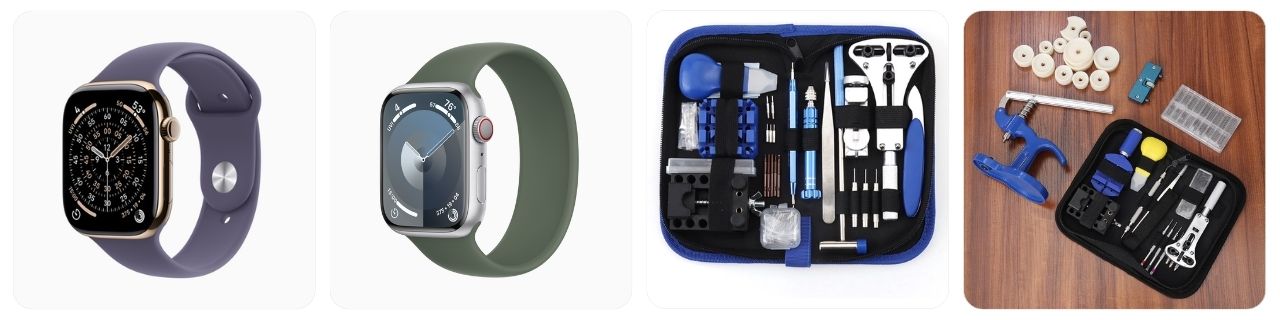
A broken Apple Watch can look pretty dramatic—a black screen, cracked display, stuck Digital Crown, terrible battery life, or a Watch that simply refuses to charge—but not every problem means it is finished. Some Apple Watch issues can be solved with charging, restarting, cleaning, updating watchOS, or re-pairing, while damaged screens, batteries, sensors, and internal hardware usually require professional service.
What are you looking for?
- Apple Watch Fix Common Issues
- Apple Watch Repair Cost
- Apple Service Center Near Me Finder
- Buy Broken Apple Watch
- Broken Apple Watch FAQ
Broken Apple Watch? Fix Common Apple Watch Problems and Issues
Apple Watch will not turn on or has a completely black screen: Start by placing the Apple Watch on its compatible magnetic charger for at least 30 minutes. Check that the charging puck, USB adapter, and outlet work correctly. If nothing appears, try a forced restart by holding the side button and Digital Crown together for about 10 seconds until the Apple logo appears. A replacement Apple Watch magnetic charger can help rule out a bad charging cable.
Apple Watch shows a red lightning bolt and will not start: A red lightning symbol normally means the battery is extremely low. Leave the Watch connected to its charger rather than repeatedly trying to turn it on. It can take a while before a severely discharged battery responds. If it remains stuck after prolonged charging with a known-good charger, the battery or charging hardware may need service.
Apple Watch battery drains unusually fast: Check Settings > Battery > Battery Health on the Watch and look at Maximum Capacity. Heavy GPS use, cellular connectivity, Always-On Display, background apps, workouts, and certain watchOS problems can increase battery use. Restart both the Watch and paired iPhone and install available updates. A badly degraded battery normally requires professional battery service rather than a simple software adjustment.
Apple Watch will not charge: Remove any protective film from a new charger, clean the back of the Watch and charging puck, and make sure the magnetic charger sits flat against the case. Try another USB power adapter or outlet. Thick protective cases can sometimes prevent proper contact, so remove the case while testing. You can also try another Apple Watch charging cable.
Apple Watch touchscreen is frozen or not responding: First make sure the display is clean and dry, then remove gloves, screen protectors, or bulky cases that might interfere with touch input. Restart the Watch normally if possible. If it is completely frozen, force-restart it using the Digital Crown and side button. Persistent dead areas or ghost touches can indicate display, digitizer, or internal damage.

JOREST Watch Repair Kit for Battery Replacement & Link Removal, Resizing &Opener, Watch Repair and Cleaning Screwdriver Set, Wrench Back Remover, Spring Bar Tool

Watch Link Removal Kit, BYNIIUR Watch Repair Kit, Watch Case Opener Spring Bar Tools, Watch Battery Replacement Tool Kit, Watch Band Link Pin Tool Set with Carrying Case and Instruction Manual

EasyTime Watch Repair Kit 149IN1: Watch Link Removal & Battery Replacement | Complete Watch Repair Tools & Kits - Easy to Repair Your Watch with Back Case Opener, Spring Bar, Manual - An Ideal DIY Gift
Apple Watch screen is cracked, shattered, or separating from the case: Stop using a Watch with badly cracked glass because exposed edges can cut your finger and moisture can enter the case. If the display is lifting without obvious impact damage, an expanding battery may be involved. Do not push the screen back down or glue it into place. Have Apple or an authorized service provider inspect it.
Apple Watch Digital Crown is stuck or difficult to turn: Dirt, sunscreen, soap residue, and dried sweat can collect around the Digital Crown. Remove the band and clean around the crown carefully using fresh water if appropriate for your model, then rotate and press it while cleaning. Avoid oils, household cleaners, or forcing the crown. Mechanical damage to the crown assembly requires professional repair.
Apple Watch will not pair with an iPhone: Make sure Bluetooth and Wi-Fi are enabled, both devices are sufficiently charged, and the iPhone is running a compatible iOS version. Restart both devices and keep them close together. If the Watch was previously owned, Activation Lock may prevent pairing until the former owner removes it from their Apple Account. Resetting the Watch cannot legitimately bypass Activation Lock.
Apple Watch keeps restarting or gets stuck on the Apple logo: Try a forced restart first. If it continues boot-looping, check whether a recent watchOS update or interrupted installation triggered the problem. Pairing or restoring the Watch may sometimes solve software corruption. Repeated restarting that continues after a restore can indicate battery instability, storage problems, damaged internal components, or another hardware fault requiring service.
Apple Watch stopped working after swimming or getting wet: Water resistance is not permanent and can decrease as seals age or after impact. Remove the Watch from water, dry the exterior, and do not use heat, compressed air, or insert objects into openings. Water Lock does not make the Watch waterproof. If the display, speaker, microphone, charging, or sensors behave abnormally afterward, arrange an inspection promptly.
How much does a Apple watch repair and maintenance cost?
Apple Watch repair prices vary considerably because Apple has produced many Series, SE, Ultra, Hermès, Nike, aluminum, stainless-steel, titanium, and cellular configurations. Apple determines the final service price after identifying and inspecting the specific device, while Apple Authorized Service Providers can also establish their own service fees. The ranges below are general U.S.-dollar estimates for budgeting rather than guaranteed Apple prices.
- Battery service: Approximately $80 – $130 for an out-of-warranty Apple Watch battery service, depending on model and service provider.
- Cracked display or accidental screen damage: Approximately $150 – $500+ depending on Apple Watch generation, case material, size, and coverage.
- Apple Watch SE hardware repair: Approximately $150 – $300+ for major out-of-warranty damage depending on generation and exact configuration.
- Standard Apple Watch Series repair: Approximately $200 – $500+ for substantial out-of-warranty hardware damage or replacement-level service.
- Apple Watch Ultra repair: Approximately $400 – $700+ for significant out-of-warranty damage, depending on model and required service.
- Digital Crown or side-button problem: Approximately $100 – $350+ where hardware service is required rather than simple external cleaning.
- Charging or power-related hardware repair: Approximately $100 – $400+ depending on whether the battery, charging assembly, or internal hardware failed.
- Water or liquid damage: Approximately $200 – $700+ because extensive internal damage may result in replacement-level service rather than component repair.
- Back sensor or case damage: Approximately $200 – $600+ depending on generation, materials, cellular configuration, and extent of physical damage.
- AppleCare accidental-damage service: Usually substantially less than full out-of-warranty service, with the applicable fee depending on model and coverage.
Keep in mind that Apple often handles Apple Watch hardware service differently from a traditional mechanical watchmaker who opens a watch and repairs individual movement components. Depending on the fault, model, parts availability, warranty status, and service program, the service solution may involve repair or replacement equipment rather than replacing one tiny component while you wait.
AppleCare can make a major difference to the cost of an accidental-damage claim. Apple also states that eligible AppleCare battery service is provided at no extra charge when the battery capacity falls below 80% of its original capacity.
JOREST Watch Repair Kit for Battery Replacement & Link Removal, Resizing &Opener, Watch Repair and Cleaning Screwdriver Set, Wrench Back Remover, Spring Bar Tool
Watch Link Removal Kit, BYNIIUR Watch Repair Kit, Watch Case Opener Spring Bar Tools, Watch Battery Replacement Tool Kit, Watch Band Link Pin Tool Set with Carrying Case and Instruction Manual
EasyTime Watch Repair Kit 149IN1: Watch Link Removal & Battery Replacement | Complete Watch Repair Tools & Kits - Easy to Repair Your Watch with Back Case Opener, Spring Bar, Manual - An Ideal DIY Gift
Apple Watch Repair & Service Center Near Me
If your Apple Watch has a cracked display, swollen battery, charging failure, damaged Digital Crown, sensor problem, water damage, or another hardware issue, the safest starting point is Apple or an Apple Authorized Service Provider.
Use Apple’s official Apple Service & Support Location Finder to locate Apple Stores and Apple Authorized Service Providers in your area. Enter your location and choose Apple Watch as the product to see nearby locations that can handle Watch service.
You can also start directly from the official Apple Watch Service and Repair page. Apple can walk you through troubleshooting and then show the available repair or replacement options for your country and device.
For general repair assistance, visit the official Apple Service and Repair page. This is also useful for checking coverage information, starting a repair, and finding certified service options.
Apple Authorized Service Providers use Apple-authorized repair procedures and genuine Apple parts for covered repairs. Depending on your location and problem, Apple Watch service may be available in person or through mail-in service. AppleCare customers may also qualify for Express Replacement in supported locations.
Before taking the Watch in, back up the paired iPhone and make sure your Apple Account information is accessible. Apple recommends unpairing or erasing the Watch as instructed for service and removing the watch band before sending or handing over the device. If you are visiting in person, bring the Apple Watch, its paired iPhone, any accessory related to the problem, proof of purchase if available, and identification where required.
Do not remove Activation Lock just because an unknown third-party buyer or repairer asks you for your Apple Account password. Your Apple Account password should never need to be handed over to an independent repair shop.
Apple currently guarantees its service and replacement parts for 90 days or for the remaining term of the original Apple warranty, whichever period is longer, subject to applicable terms and consumer law.
Broken Apple Watch For Sale
Thinking about buying a broken Apple watch as a DIY repair or restoration project? Below, you’ll find listings for Apple watches that may need servicing, replacement parts, or other repairs. Before purchasing, carefully review the item description, photos, seller feedback, return policy, and stated condition, and complete your own due diligence to make sure the watch is suitable for your repair skills and budget.
Broken Apple Watches can be tempting because older models sometimes sell extremely cheaply, but check the exact model number before buying. A Series 5, Series 9, SE, Ultra, and Ultra 2 may look fairly similar in listing photographs while having very different values, components, repair difficulty, and parts compatibility.
Activation Lock is particularly important when purchasing a damaged Apple Watch. Ask the seller to confirm that the Watch has been removed from the previous owner’s Apple Account. A perfectly repairable Watch that remains Activation Locked may still be unusable by the buyer.
Also watch out for listings described as “just needs a battery” unless there is evidence supporting that diagnosis. A Watch that will not power on could have a bad battery, damaged display, charging failure, liquid damage, board-level fault, or several problems at once.
If the display is separating from the case, treat a swollen battery as a possibility. Lithium-ion battery work requires considerably more care than replacing a conventional coin-cell watch battery. Do not puncture, bend, crush, or reuse a swollen battery.
For a DIY project, simple jobs such as replacing a removable band are far more beginner-friendly than opening the case. Search for an Apple Watch repair tool kit if you intend to work on an out-of-warranty donor device, but remember that opening the case can damage the display and compromise the original water-resistant seals.
Broken Apple Watch Repair FAQ
Is a broken Apple Watch worth repairing?
It depends heavily on the model. Repairing a recent Apple Watch Series, SE, or Ultra can make financial sense, especially with AppleCare coverage. For a much older generation, compare the repair estimate with the cost of a newer replacement because major out-of-warranty service can sometimes approach the value of the Watch itself.
Can the battery in an Apple Watch be replaced?
Yes. Apple provides battery service for Apple Watch models that qualify for service. If you have eligible AppleCare coverage and the battery holds less than 80% of its original capacity, Apple states that battery service is provided at no additional charge. Out-of-warranty battery service normally carries a fee.
Can Apple repair a cracked Apple Watch screen?
Apple provides service options for damaged Apple Watch models, including accidental physical damage. The exact cost depends on the model, case material, coverage, country, and damage. With eligible AppleCare coverage, the accidental-damage service fee can be considerably lower than normal out-of-warranty service.
Why won’t my Apple Watch turn on even after charging?
First test a known-good compatible charger and leave the Watch connected long enough to recover from a deeply discharged battery. Then try a forced restart by holding the side button and Digital Crown. If there is still no response, possible causes include battery failure, a damaged display, charging hardware failure, liquid damage, or another internal hardware problem.
Can I repair an Apple Watch myself?
Basic jobs such as replacing the removable band are easy, but internal Apple Watch repairs are considerably more difficult. The display is adhered to the case, lithium-ion batteries require careful handling, tiny flex cables can be damaged easily, and opening the Watch can compromise water resistance. For a valuable or current model, Apple-certified service is usually the safer option.
Related posts

Popular Articles
Recent Articles
- Apple Watch – Price List and Dealer Finder
- Apple Watch Parts & Diagram
- Apple Watch Repair – Fix Broken Apple
- Apple Watch Service Center & Dealer Near Me
- Swatch Watch – Price List and Dealer Finder
JOREST Watch Repair Kit for Battery Replacement & Link Removal, Resizing &Opener, Watch Repair and Cleaning Screwdriver Set, Wrench Back Remover, Spring Bar Tool
Watch Link Removal Kit, BYNIIUR Watch Repair Kit, Watch Case Opener Spring Bar Tools, Watch Battery Replacement Tool Kit, Watch Band Link Pin Tool Set with Carrying Case and Instruction Manual

JOREST Watch Battery Replacement Kit, Watch Repair Screwdriver, Watch Band Replacement tool, Watch Wrench Back Remover, Watch Case Opener, Watch Back Remover Holder, Spring bar, Tweezers

